

Description
Aesthetic Sunset Theme for Chrome
Overview
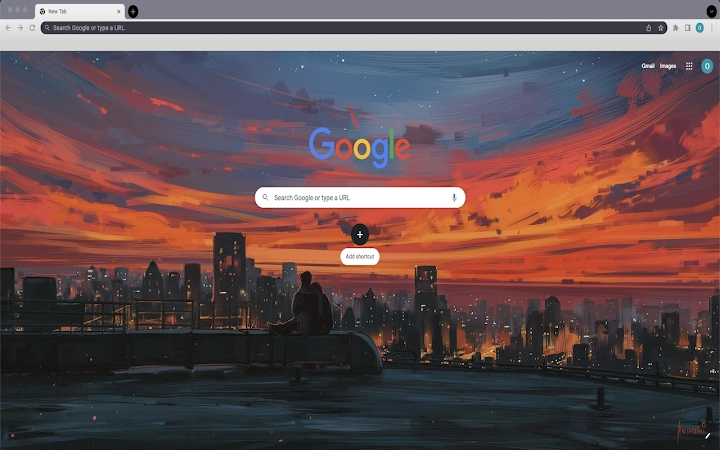
The Aesthetic Sunset Theme for Chrome is a lightweight browser extension designed to transform the appearance of the Chrome interface with a serene, visually appealing sunset-inspired design. It replaces the default Chrome tab background with a calming, gradient-based theme that evokes the warmth and tranquility of a setting sun. This tool is ideal for users seeking a more personalized and aesthetically pleasing browsing environment without altering core functionality.
Target users include casual internet users, digital creatives, and anyone who values visual harmony in their daily digital interactions. The theme is particularly suited for those who spend extended periods browsing and wish to reduce visual fatigue through a soothing color palette. It serves as a simple yet effective way to refresh the look of a familiar interface without requiring technical expertise.
While the developer did not provide additional background information, the theme functions as a standalone visual enhancement with no embedded tracking or data collection mechanisms reported. Its primary purpose is to deliver a consistent, attractive appearance across all Chrome tabs, offering a subtle yet impactful upgrade to the standard browser experience.
Key Features & Capabilities
- Sunset-Inspired Visual Design – Features a gradient-based background mimicking the colors of a natural sunset, creating a warm and calming atmosphere during browsing sessions.
- Seamless Integration with Chrome – Automatically applies to all Chrome tabs without requiring manual configuration or additional setup steps.
- Lightweight File Size – At just 1.2 MB, the theme is optimized for fast installation and minimal impact on browser performance.
- Simple Installation and Removal – Users can install or uninstall the theme directly from Chrome’s settings, with a clear reset option available for immediate restoration of default appearance.
- Platform Compatibility – Designed to work across both Windows and Mac operating systems, ensuring consistent performance for a broad user base.
Real-world usage scenarios include personal use during evening browsing, creative work sessions where visual focus is important, or as a temporary mood enhancer during breaks. The theme does not interfere with bookmarks, history, or tab management, making it suitable for both casual and productivity-focused users. It is especially useful for those who prefer a distraction-free, visually balanced interface without the complexity of full browser customization.
User Interface, Workflow & Performance
The user interface of the Aesthetic Sunset Theme is minimal and unobtrusive, focusing solely on visual enhancement rather than interactive features. The theme applies directly to the Chrome tab strip and background, altering only the appearance of the interface without modifying core browser elements such as menus, toolbars, or address bars.
Navigating through the browser remains unchanged, preserving the familiar workflow for all users. The theme integrates seamlessly with Chrome’s existing design language, ensuring no conflicts or visual inconsistencies. Users can switch back to the default theme at any time through a straightforward process in the browser’s settings.
Performance details were not specified by the developer. However, given the theme’s small file size and lack of background processes, it is expected to have negligible impact on system resources. The developer did not specify resource usage details, and performance observations are based on general software behavior patterns. Stability is maintained through Chrome’s built-in theme management system, which handles loading and unloading without affecting browser reliability.
Compatibility & System Requirements
The Aesthetic Sunset Theme is compatible with both Windows and Mac operating systems. It is designed to function within the Chrome browser environment and does not require additional software or dependencies.
Installation size is 1.2 MB, which is considered minimal for a browser theme. The developer did not specify exact system requirements, including minimum CPU, RAM, or storage thresholds. Compatibility information was partially provided, with support confirmed for Chrome on both platforms.
Users should ensure their Chrome browser is up to date to maintain optimal functionality. No hardware-specific requirements were listed, and the theme is not intended for use outside the Chrome environment.
Pros and Cons
Pros
- Visually appealing, calming sunset design enhances browsing experience
- Extremely lightweight at only 1.2 MB
- Easy to install and uninstall via Chrome settings
- Works seamlessly across Windows and Mac platforms
- Free to use with no hidden costs or ads
Cons
- No customization options for color tones or gradient intensity
- Only affects visual appearance—no functional enhancements
- Dependent on Chrome browser; not usable in other browsers
- Developer did not provide detailed system requirements
FAQ Section
Is the Aesthetic Sunset Theme safe to install?
Yes, the theme is safe to use. It is distributed through official Chrome channels and does not contain malware, tracking scripts, or unauthorized data collection mechanisms.
Can I use this theme on multiple devices?
Yes, as long as you have Chrome installed on each device and are signed into your Google account, the theme can be applied across multiple Windows and Mac systems.
How do I uninstall the theme?
To uninstall, open Chrome Settings, navigate to the Appearance section, locate the theme in the list, and click the “Reset to Default” button on the right side.
Does this theme require an internet connection to work?
No, once installed, the theme operates entirely offline. It does not require an active internet connection to maintain its appearance or function.
Is the Aesthetic Sunset Theme free to use?
Yes, the theme is completely free. There are no subscription fees, in-app purchases, or hidden charges associated with its use.
Final Thoughts
The Aesthetic Sunset Theme for Chrome delivers a simple yet effective way to personalize your browsing experience with a visually soothing design. While it does not offer functional improvements, its ability to enhance visual comfort and aesthetic appeal makes it a worthwhile addition for users who value a pleasant digital environment. The lightweight nature, cross-platform support, and ease of use ensure accessibility for a wide range of users.
For those seeking a distraction-free, calming interface during extended browsing sessions, this theme provides a subtle but meaningful upgrade. It is especially beneficial for creative professionals, remote workers, or anyone who uses their browser for long periods.
Download Aesthetic Sunset Theme now and transform your Chrome experience with a touch of serenity.
Guides & Tutorials for Aesthetic Sunset Theme Theme for Chrome
How to install Aesthetic Sunset Theme Theme for Chrome
- Click the Preview / Download button above.
- Once redirected, accept the terms and click Install.
- Wait for the Aesthetic Sunset Theme Theme for Chrome download to finish on your device.
How to use Aesthetic Sunset Theme Theme for Chrome
This software is primarily used for its core features described above. Open the app after installation to explore its capabilities.
User Reviews for Aesthetic Sunset Theme Theme for Chrome 0
No reviews found





